



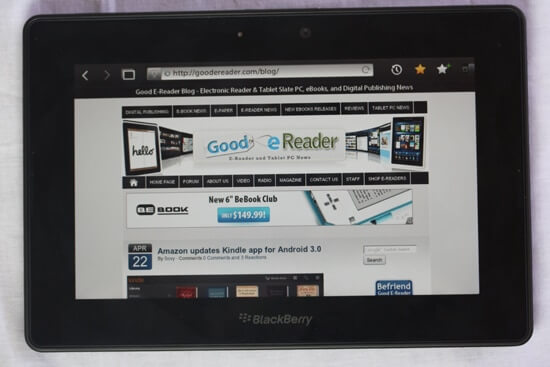
The Playbook is the first tablet from Canadian based company Research in Motion. They have had a long standing tradition focusing on enterprise level hardware in the form of smartphones and delivering strong email access. The Playbook marks the company’s first foray into the realms of Tablet PCs. We’re wondering if it delivers the goods or is it worse than the Storm?
Hardware
The Blackberry Playbook has a 7 inch capacitive touchscreen with gesture support. There are no physical buttons on the unit other than the power and volume buttons. This means interaction with any of the menus or programs depends totally on sweeping your finger access the screen in different ways. The display resolution is very solid at 1024×600 and runs on a 1 GHZ Cortex A9 dual core processor. It has 1 GB of ram which makes multitasking applications very snappy.
There are three different models of the initial offering of the RIM Playbook, 16 GB, 32 GB, and 64 GB. The cost is depending on what model you want to go for. Right now, it does not have SD card support, so you cannot enhance the built in memory with one.
It has dual HD cameras, one on the back of the device which is 5 MP and the front facing 3 MP which supports 1080P HD video recording. Speaking of video, it plays back 1080P HD video with the H.264, MPEG, DIVX, and WMV formats. We found the cameras on the Playbook to be quite excellent! The rear facing one is a pleasure to use and does not bog you down with a ton of settings and options to get the best shot. It also shoots both still images and video, so you can do either and view your content via the Photo or Video Application. The front facing camera is very respectable. Most tablets, including the iPad 2 have abysmal front facing cameras, often less then 1.0 mega pixel. Since the Playbook has 3, you get very good quality video. This will really help with video conferencing software for important meetings or to chat with friends.
Audio playback is done with the stereo speakers and will support MP3, AAC, and WMA formats. The speakers themselves are on both sides of the screen and are front facing. This is such a big deal that most people have overlooked when they evaluated the Playbook. Most tablets such as the Motorola Xoom, iPad 2, and many more all have rear facing speakers. This makes it very hard to get good audio quality when you are cradling it in your lap or if you are laying down and using it. Often the speakers and sound get very muffled. The Playbook gets audio right on by having the 1 speaker on the left and right hand side of the screens. This insures crystal clear audio at all times and was a tremendous boon in comparison to the competition.
The Playbook comes with a wall charger used to power the device and has a Micro USB connector in order to charge the device. You also get a Micro USB connector so you can transfer media back and forth between your Playbook and your PC. If multimedia is your thing, it has a Mini HDMI port to plug it into your media units to play full 1080p videos.
Aesthetically, the Playbook is a slick piece of hardware. It feels very elegant and the build quality is very high. Since it is only 7 inches it basically fits in your pocket and is easily transportable. Most of the times when I check out 6 or 7 inch tablets they feel a little bit square and are not that easily transportable. The Playbook feels more like a rectangle and seems to fit in your back pocket with ease.
Software
The Playbook uses the QNX operating system that RIM purchased last year. The first model to use this new operating system was the Blackberry Torch, which is a staple device for many people in the tech industry.
QNX is a robust operating system and really shines on the Playbook. It handles true multi-tasking very well and I found the device never lagged, no matter how many programs I had open. Although the lag was non-existent I did find many different ways to crash the device, such as going to Google Maps.
There are many bundled applications that come with the device such as Facebook, Twitter, Gmail, Yahoo, AOL Mail, and so on. These “applications” are not TRUE applications but basically short cuts to open the web browser to launch their webpage counterparts.
Lets first look at the web browser and the entire internet experience. To start you need a WIFI connection. If you are not in a WIFI area but have a Blackberry phone you can “Tether” the device and use your phone’s 3G connection for your Playbook to access the internet. This is done via bluetooth and not all service provides allow this service. Recently AT&T had axed this capability due to rising data usage bogging down its network.
The Web browser is very solid, web pages load very fast, and you have the ability to have tabs. This is sort of like the Safari version of tabs where you click on the tab button and see real time images of what is happening in your different windows. There is also an Options menu through which you can turn off Javascript, Flash, and other things. You can even enable full privacy browsing, so you can prevent cookies from caching on your unit and be mostly anonymous. Sometimes when you are browsing a site, reading a blog, checking out videos, or reading web comics you can simply turn the entire navigation bar off with a click of a button. This is the equivalent of full screen mode, and many tablets seem to lack this basic functionality.
Really, the internet experience on the Playbook is very excellent. It does HTML 5, Adobe Flash, and Javascript, which means the entire internet is at your fingertips without having to make compromises.
One of the things I liked the best about the internet experience on the Playbook was the robust pinching and zooming feature on webpages. It rivaled or surpassed the iPad in terms of fluid zooming. The keyboard also is one of the best aspects and is very evident during your overall web experience. Whether you are typing domain names, search terms or filling in fields the keyboard is better then the Android version.
The Playbook did not launch with a ton of applications to really make it stand out against the avalanche of Android tablets. Some things you get which are reliable staples of a computing experience is your Music Player that displays cover art and allows for a great music experience. You can create playlists, but it does not have any kind of EQ to manage your sound levels.
Some of the unique applications found on the device are compliments of third parties that signed deals with RIM as content distribution partners. Kobo has made its own version of the Kobo ecosystem for the Playbook so you can easily download any of the 1.3 million books, newspapers, and magazines directly to your unit.
If books are not your thing (what are you doing on goodereader!) you can purchase music via 7 Digital. The 7 Digital music application is actually better designed for the Playbook then it was for the Samsung Galaxy Tab.
Of course there is the ubiquitous video player, word and excel to go, calculator, slacker radio, and a few others. Most of the applications are really nothing to write home about.
One of the highly touted features of the Playbook throughout its entire development cycle was the new version of Blackberry App World. App World is the portal in which you download games, applications, wallpapers, and other content and deliver it right to your device. The Playbook version of the App Store is quite different from the same one you have accessed with your Blackberry Phone. I noticed the selection of apps is terrible and most again seem like short cuts to websites or RSS Readers. There are very few quality apps or games available. There is no official Facebook, Twitter, Foursquare, or anything else as of press time.
While we are on the subject of applications, someone has to be said with the missing essentials. The Playbook did not ship with Contacts, E-Mail, Blackberry Messenger, Enterprise email or any of the quintessential elements that propelled RIM into being the company of choice for the business crowd. They basically tried to rush the device out to the market too fast and are relying on future firmware updates to address these problems. If you are an early adapter you are in luck, there are workarounds.
Blackberry made some new software called “Bridge.” If you have an existing Blackberry phone such as the Torch you can have your Playbook display a unique barcode that you scan with your phone. It then takes you to Blackberry App World where you can download the Bridge application to your phone. The tricky part is syncing your phone with your tablet which takes a bit of patience. With some screen prompts you basically scan another barcode to enter your Playbook’s unique signature into your phone and establish a connection between your Playbook and phone. Once you do this, your Playbook will display a new category on the menu called Bridge. This will allow you to access your Blackberry Email, Contacts, Calender, Tasks and even the SD card on your phone. If you make any new contacts or make a new task it will then sync with your phone and appear there as well.
What I found cool about this whole process is that you only need to do it once and when your Playbook and phone are in proximity of each other, the relationship will always be established. This makes the long term maintenance a little bit easier to mange because you do not have to manually sync or turn anything on or off.
Having the Blackberry Bridge software has been the saving grace for early adapters to be able to access your essential Blackberry services via your phone.
RIM recently announced that they will be incorporating Google Android applications into the pipeline of the Playbook soon. What this means is that you will be able to run most Android apps on your Playbook! Despite the Playbook not having Android as the core OS like most tablets, it is adapting the functionality to install common applications and games. Angry Birds Seasons here we come.
Our Prospective of the Playbook
I love Blackberry! I have been using their phones since they really started making them and have upgraded to around seven different phones during various upgrade cycles. There is some mystical allure about Blackberries that somehow brings a camaraderie amidst people. It was the same kind of charm when the Kindle came out or the iPad 1 first dropped. If you saw someone with one, you instantly could just talk with them and get along. Blackberry felt like the same kind of company. Blackberries are certainly not for everyone, but the people who love them, LOVE them. I really want this tablet to succeed because there is lots of room in the market for a more business tablet, rather then just all of the consumer ones you see inundating the market place.
I mainly use my Blackberry Phone because of the Push and secure email system; really it’s second to none in the world of mobile email. The enterprise level of email delivery is unparalleled and the big draw with doing business with RIM to begin with. It is really too bad that the unit did not ship with basic RIM delivered email functionality. Although I can access email via the Bridge application you can’t do simple things like “delete all prior” and other quickly managed short cuts.
The applications that come bundled with the Playbook are the largest shortcomings of the device. Sure you have the essentials such as Music, Video, Web Browsing, and Documents to Go but there are no great applications that blow you away. The App World is a baron wasteland of content that is worse then finding a needle in the Mojave Dessert. Its nice that it comes bundled with Adobe Reader for PDF files, but if you are reading ebooks and not technical manuals the whole page turning and refresh rate is very poor. If you want to read on this device you are basically out of luck. Besides Kobo, there are no other reading applications at all. You cannot get any of the other companies such as Barnes & Noble, Amazon, Sony. There aren’t even independent programs you can get that will display ePub books that you load on the device yourself.
The Playbook is a slick piece of technology and I love the gesture support in the absence of physical buttons. Their UI is very intuitive and once you figure our the gestures necessary to enter multitasking mode, exit, and other functions it becomes second nature and suddenly pressing buttons seems so passé.
Really the Playbook is a great piece of technology. It is currently my new favorite 7 inch tablet in terms of raw power and a unique OS that delivers a superior user experience. It feels very good to carry around and hold, does not weigh too much, and looks like a high end piece of hardware.
My hope is that Blackberry issues many firmwares to fix the integration of essential services and features as demanded by their devoted following. This limitation is what is holding it back from getting distribution deals from companies like Verizon, which doesn’t see it as a viable gadget, or AT&T which blocks Bridge.
The Pros
Build Quality
Solid Internal Components
Web Browsing
Fluid Multitasking
Cons
Poor Quality of bundled Apps
No email, Calender, Contact List, Blackberry Instant Messenger
App World is devoid of anything of value
HULU and other streaming services don’t work
Rank 7.5/10
[cincopa AQPAHlKOVo9Z]

Michael Kozlowski is the editor-in-chief at Good e-Reader and has written about audiobooks and e-readers for the past fifteen years. Newspapers and websites such as the CBC, CNET, Engadget, Huffington Post and the New York Times have picked up his articles. He Lives in Vancouver, British Columbia, Canada.


